1
2
3
4
5
6
7
8
9
10
11
12
13
14
15
16
17
18
19
20
21
22
23
24
25
26
27
28
29
30
31
32
33
<!DOCTYPE html>
<html>
<head>
<meta charset="UTF-8">
<!-- day33.버튼에 이벤트처리추가 -->
<title>form input tag Test</title>
 
<!-- 2.js-internal방식 -->
<script type="text/javascript">
    function userClick(){
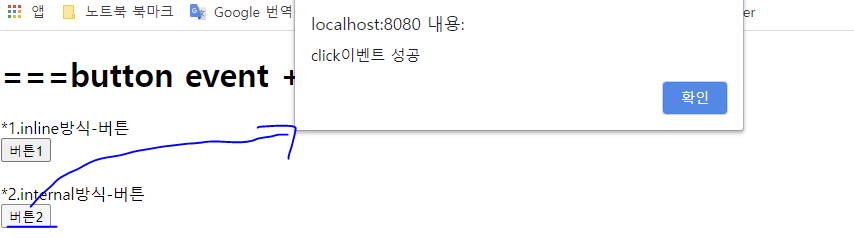
        alert('click이벤트 성공');
    }
 
</script>
 
</head>
<body>
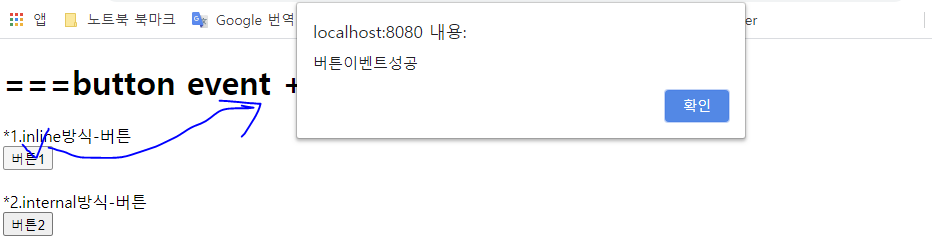
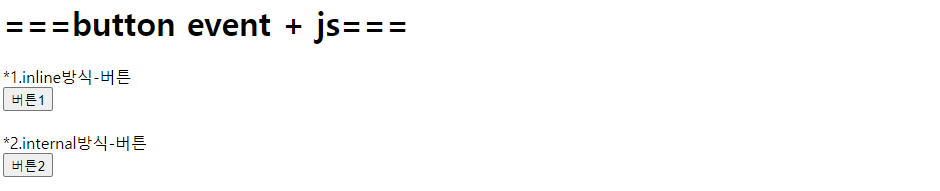
    <h1> ===button event + js===</h1>
    
    <!-- 버튼에 이벤트처리추가 -->
    *1.inline방식-버튼<br> 
    <!-- 1.js-inline방식 -->
<input type="button" value="버튼1" id="btnClick" onclick="javascript:alert('버튼이벤트성공')"> <br><br>
 
    *2.internal방식-버튼<br>
    <input type="button" value="버튼2" id="btnClick" onclick="userClick()"> <br><br>


</body>
</html>
 
cs

http://localhost:8080/day33_html/html+js/button.html
  • \n 개행(한 줄 바꿔 출력)

  • \t 탭 (스페이스기능)

  • \\ 역슬래시 표시

  • \" 쌍따옴표 표시

  • \' 온따옴표 표시

(html파일)

1
2
3
4
5
6
7
8
9
10
11
12
13
14
15
16
17
18
19
20
21
22
23
24
25
26
27
28
<!DOCTYPE html>
<html>
<head>
<meta charset="EUC-KR">
<title>ex17_inputType2</title>
</head>
<body>    
    <!-- .jsp파일로 넘김 -->
    <form action="ex17_test.jsp" method="post" autocomplete="off">
    
    <fieldset>
    <!-- 줄로감싸서 구분가능 -->
        <label for="fnameid"> Name(여기를눌러도됨): </label> 
        <!-- label for="실행을원하는 input의 id명" => label안의 글자를 눌러도 해당 input이 실행 -->
            First Name : <input type="text" name="fname" autocomplete="off" id="fnameid"><br />
            Last Name : <input type="text" name="lname" autofocus="autofocus" 
                        pattern="[A-Za-z]{3}" title="세글자만 포함하세요." required="required"><br />
    </fieldset>
    
    <fieldset>
        <label for="emailid"> email(여기를눌러도됨):</label>
            Email : <input type="email" name="email" autocomplete="off" id="emailid"><br />
    </fieldset>
    
        <input type="submit" value="send">        
    </form>
</body>
</html>
cs

(jsp파일)

1
2
3
4
5
6
7
8
9
10
11
12
13
14
15
16
17
18
19
20
21
<%@ page language="java" contentType="text/html; charset=utf-8"
    pageEncoding="utf-8"%>
<!DOCTYPE html>
<html>
<head>
<meta charset="utf-8">
<title>Insert title here</title>
</head>
<body>
 
    <%
        String fname=request.getParameter("fname");
        String lname=request.getParameter("lname");
        String email=request.getParameter("email");
        
        out.print("이름은 " + lname+fname + "<br>");
        out.print("메일주소는 " + email);
    %>
 
</body>
</html>
cs

http://localhost:8080/day33_html/1/ex17_inputType2.html


1
2
3
4
5
6
7
8
9
10
11
12
13
14
15
16
17
18
<!DOCTYPE html>
<html>
<head>
<meta charset="EUC-KR">
<title>ex17_inputType</title>
</head>
<body>
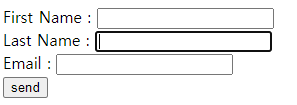
    <form action="" method="post" autocomplete="off">
        First Name : <input type="text" name="fname" autocomplete="off"><br />
        Last Name : <input type="text" name="lname" autofocus="autofocus" 
                    pattern="[A-Za-z]{3}" title="세글자만 포함하세요." required="required"><br />
                    <!-- 대소문자합해서 3글자만써야함 -->
        
        Email : <input type="email" name="email" autocomplete="off"><br />
        <input type="submit" value="send">        
    </form>
</body>
</html>
cs


http://localhost:8080/day33_html/1/ex17_inputType.html


jqueryvalidation.org/


jQuery Validation Plugin | Form validation with jQuery

This jQuery plugin makes simple clientside form validation easy, whilst still offering plenty of customization options. It makes a good choice if you’re building something new from scratch, but also when you’re trying to integrate something into an exi

jqueryvalidation.org


1
2
3
4
5
6
7
8
9
10
11
12
13
14
15
16
17
18
19
20
21
22
23
24
25
26
27
28
29
30
31
32
33
34
35
36
37
38
39
40
41
42
43
44
45
46
47
48
49
50
51
52
53
54
55
56
57
58
59
60
61
62
63
64
65
66
67
<!DOCTYPE html>
<html>
<head>
<meta charset="UTF-8">
<title>회원가입 form</title>
 
<style type="text/css">
    
    h1 {
        text-align: center;
    }
    
    table {
        text-align: left;
        width: 800;
    }
 
</style>
 
</head>
<body>
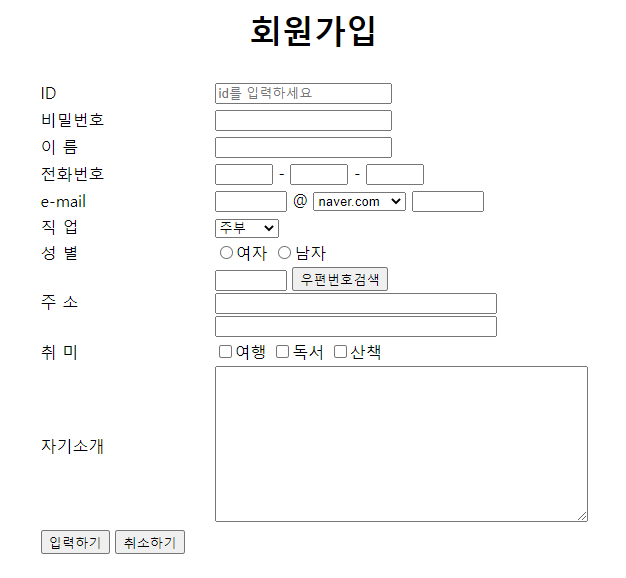
    <h1> 회원가입 </h1>
    
    <form action="" method="post">
        <!-- 11행 2열 -->
        <table align="center">
            <tr> <th width="170"></th> <th></th> </tr>
            <tr> <td>ID</td> <td><input type="text" placeholder="id를 입력하세요"> </td></tr>
            <tr> <td> 비밀번호 </td> <td><input type="password" name="pwd" id="pwd"> </td></tr>
            <tr> <td> 이  름 </td> <td><input type="text"> </td></tr>
            <tr> <td> 전화번호 </td> <td><input type="text" size="3"> - <input type="text" size="3"> - <input type="text" size="3"> </td></tr>
            <tr> <td> e-mail </td> <td><input type="text" size="5"> @ 
                <select>
                    <option value="email1"> naver.com </option>
                    <option value="email2"> google.com </option>
                    <option value="email3"> hanmail.net </option>
                    <option value="email4"> 직접입력 </option>
                </select> 
                <input type="text" size="5"> 
             </td></tr>
            <tr> <td> 직  업 </td> <td><select>
                    <option value="job1">주부</option>
                    <option value="job2">개발자</option>
                    <option value="job3">요리사</option>
                    <option value="job4">회사원</option>
                    <option value="job5">기타</option>            
            </select> <br>
             </td></tr>
            <tr> <td> 성  별 </td> <td><input type="radio" name="gender" value="F">여자
                <input type="radio" name="gender" value="M">남자 
             </td></tr>
            <tr> <td> 주  소 </td> <td><input type="text" size="5"> <input type="button" value="우편번호검색" id="btnClick"><br>
                <input type="text" size="35"><br>
                <input type="text" size="35">
             </td></tr>
            <tr> <td> 취  미 </td> <td><input type="checkbox" name="hobby" value="travel">여행
                <input type="checkbox" name="hobby" value="book">독서 
                <input type="checkbox" name="hobby" value="walk">산책 
             </td></tr>
            <tr> <td> 자기소개 </td> <td><textarea rows="10" cols="50"></textarea> </td></tr>
            <tr> <td> <input type="submit" value="입력하기">&nbsp;<input type="reset" value="취소하기"> </td> <td> </td></tr>
        </table>
    
    </form>
</body>
</html>
 
cs


http://localhost:8080/day32_html/html/quiz1_회원가입.html


'HTML,CSS,JS,jQuery,AJAX > code by me' 카테고리의 다른 글

jQuery - 회원가입 + 유효성 검사  (0) 2021.03.02
js - 반복문이용한 구구단  (0) 2021.02.24
html+css - Calendar  (0) 2021.02.22

메모장, 에디터플러스, 울트라에디트,...한글,....이클립스 등에서 편집가능

'HTML,CSS,JS,jQuery,AJAX > etc' 카테고리의 다른 글

정규식 표현  (0) 2021.03.02
Server Side Script와 Client Side Script  (0) 2021.02.22

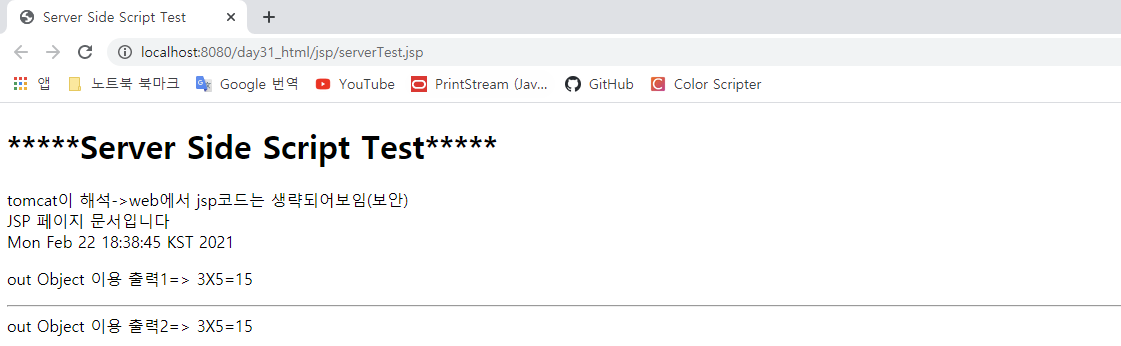
<Server Side Script> -jsp파일

1
2
3
4
5
6
7
8
9
10
11
12
13
14
15
16
17
18
19
20
21
22
23
24
25
26
<%@ page language="java" contentType="text/html; charset=UTF-8"
    pageEncoding="UTF-8"%>
<%@ page import="java.util.*" %>
 
<!DOCTYPE html>
<html>
<head>
<meta charset="UTF-8">
<title>Server Side Script Test</title>
</head>
<body>
    <h1>*****Server Side Script Test*****</h1>
    tomcat이 해석->web에서 jsp코드는 생략되어보임(보안) <br>
    JSP 페이지 문서입니다 <br>
    <%= new Date() %> <p>
    <%
        int num=3;
        int num2=5;
        int result=num*num2;
        
        out.print("out Object 이용 출력1=> " + num + "X" + num2 + "=" + result);
    %>
    <hr>
    <%= "out Object 이용 출력2=> " + num + "X" + num2 + "=" + result%>
</body>
</html>
cs


<Client Side Script>-html파일들

서버 구축 안되어 있어도 실행됨. 브라우저가 해석하기 때문에 웹브라우저만 있으면 실행됨


'HTML,CSS,JS,jQuery,AJAX > etc' 카테고리의 다른 글

정규식 표현  (0) 2021.03.02
편집기 종류  (0) 2021.02.22

+ Recent posts